Voice First: "Hey Sparkle"
Sparkle is built to be voice-first. Say the wake phrase, "Hey Sparkle," speak naturally, and your words land in the Sparkle Composer as clean text. You read them, fix anything you want, and only then does it go to your agents. Speaking is roughly 3× faster than typing, and you can still type any time you prefer.
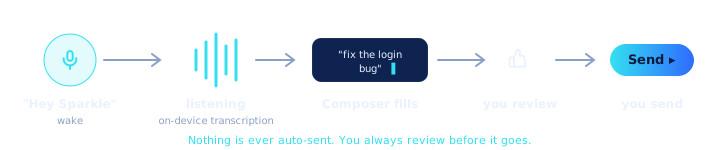
The whole loop is one simple pipeline: wake, transcribe, fill the Composer, you review, then send. That review step in the middle is the point. Your voice fills the editor; it never fires off a command on its own.
How it works
Here is the friendly version, with no jargon left behind. Sparkle is quietly listening for one phrase and one phrase only: "Hey Sparkle." Until it hears those exact words, it is not transcribing anything you say, so you can talk to a coworker or hum to yourself in peace.
When you do say "Hey Sparkle," Sparkle wakes up and starts turning your speech into text, which appears live in the Sparkle Composer (the editor box where you tell Sparkle what to build). Talk the way you would explain an idea to a friend: "Hey Sparkle, add a sign-up form to the home page." When you are done, a short spoken stop phrase finishes the dictation and submits it for you, or you can just reach over and click send yourself.
The key thing to relax about: nothing happens to your project until you review the text and send it. Voice is just a faster way to fill in the box. If a word came out wrong, click into the text and fix it like any normal editor before you send.
Wake word on, talk, watch it fill the Composer, glance, send. That is the entire muscle memory. "Hey Sparkle" flips dictation on; a spoken stop phrase (or a click) closes it out and submits. No push-to-talk to hold, no mode you have to remember to exit.
The leverage move is to think out loud. You do not need a polished prompt before you start talking, because the text lands in a real editor: ramble the idea, then tighten it in place before you send. Long, detailed instructions are where voice pulls ahead hardest, since you are not paying the per-character typing tax on a paragraph of context. Dictate the whole spec, skim it, ship it.
Pair this with the Composer's other affordances and you barely touch the keyboard: speak the bulk, drop in a screenshot, fix one word, send.
Mechanics, since you will want them. It is an always-listening loop with a local wake-word matcher. "Hey Sparkle" is matched phonetically with fuzzy tolerance, so common ASR artifacts ("hey sparql," "hey sprinkle") still trigger it instead of dropping your wake. Until the wake fires, audio is not being treated as a prompt.
Transcription runs on-device by default (a local speech model with voice-activity segmentation), so your dictation does not leave the machine to become text. There is an optional AI-enhanced cloud dictation path that opens only after the wake word fires and only if you have AI credits; it is opt-in, not the default. The transcript streams into the Composer, a spoken stop phrase ends capture, and you review before anything is sent. No transcript is ever dispatched to an agent without that explicit send.
Why it matters
The case for voice is not vibes. It is measured.
Speech recognition input was about three times faster than typing, with a lower error rate.
Think about how much faster you can describe something than type it perfectly. That gap is the whole benefit. Studies put speech at around 2.93× faster than typing, with fewer mistakes, which means you get your idea out of your head and into Sparkle before you talk yourself out of it.
For you specifically, voice removes the scariest part of building: the blank box and the blinking cursor. You do not have to know the "right" way to phrase anything. You just say what you want, see it written down, and adjust. It turns building into something that feels like talking, which is a thing you already know how to do.
~2.93× faster, ~20% fewer errors. That is not a rounding error across a day of shipping; that is real throughput. The longer and more detailed your instructions, the bigger the win, and detailed instructions are exactly what gets you better output from your agents.
The second-order benefit: because the transcript lands in the Composer before it sends, you get speed and a review beat. You are not trading accuracy for pace. You dictate fast, scan once, and send something tighter than you would have bothered to type. Velocity with a safety glance built in.
Two numbers worth caring about: ~2.93× throughput and ~20% fewer errors versus typing (Ruan et al., 2017). For the kind of work you do here, dictating a paragraph of context or an architectural constraint, that is the difference between writing it and not bothering.
The part that should matter to a skeptic is the on-device default and the mandatory review step. This is not a hot mic streaming everything you say to a server, and it is not auto-firing commands off a transcript. It is local speech to text, into an editor, gated by your send. Fast where speed is free, careful where it is not.
vs. the 1980s terminal
The old way of working with computers is a black text window where you have to already know the exact magic words and type them without a single typo. It cannot listen. It cannot understand "add a sign-up form." It only takes precise, memorized commands.
Sparkle is the opposite of that. You speak plain English, it writes the text for you, and the friendly editor lets you fix anything before it runs. You are not expected to learn the magic words. You just say what you mean.
The terminal makes you the typist and the spell-checker. Wrong flag, half- remembered syntax, a typo three words back you cannot reach without arrowing over character by character. None of that scales when you are trying to move fast.
Voice plus the Composer flips it: you describe intent, you get editable text, and you correct in place with a real cursor instead of backspacing a whole line. The friction the terminal charged you on every prompt is just gone.
A shell reads stdin. That is the contract, and it has not changed since the 1980s: one human, typing exact tokens, no concept of spoken input. Sparkle does not fight that; it runs the real Claude Code engine underneath and adds a voice layer above the terminal, with the transcript landing in a real editor instead of raw stdin.
So you keep everything the shell is good at and stop paying the keystroke tax on the parts that never deserved it. Talk the long context, type the surgical edit, send when it is right. The terminal is still one click below you the whole time.