Claude Code is extraordinaryThe 1980s era terminal it lives in is not
Sparkle wraps the real Claude Code terminal in a modern voice-first interface built for people who think in ideas, not commands.
Set the mic to Speak and I'll start listening as you talk.
SendShip modern software without being stuck in the 1980s.
The 80s called. They want their terminal back.
The terminal hasn't changed since 1987. Same black box. Same cursor. Same complete indifference to how humans actually think and work.
You can't talk to it. You have to memorize arcane commands. You can't click to place your cursor. You can't highlight a word and delete it. There's no undo. There's no right-click. If you press the wrong key mid-prompt, the whole thing is gone.
Really? This is supposed to be how we interact with the most modern, powerful AI technology humanity has ever built?
The AI inside that terminal is extraordinary. The interface around it is a 40-year-old relic. Sparkle fixes that with a beautiful modern voice-first Composer interface that communicates with the 80s so you don't have to.
1980s terminal
Sparkle Composer
Software starts with an idea. Not a prompt.
Every other tool drops you straight into building: type a prompt, get some code, hope for the best. Sparkle runs in three gears instead. And the order is the whole trick.
Every instinct screams to skip to Build. Don’t. Five minutes shaping a spec beats an hour watching agents confidently build the wrong thing, then burning more tokens unwinding the mess.
Think
Ideate with AI thought partners that interview you, challenge your assumptions, and pull a high-fidelity spec out of the fog in your head. Nothing you write here touches your code.
powered by
Plan
Sparkle breaks that spec into a prioritized, dependency-ordered task list, a real work breakdown you can read, not a vibe and a prayer.
powered bybeads+superpowers
Build
Orchestrator agents spin up workers in isolated git worktrees, turning the plan into working software. You review every line before you keep it.
powered byClaude Code
Think → Plan → Build → Think. The loop is intentional. That’s how real software gets made.
Why Think → Plan → Build? →Just talk.
Voice is 3x faster than typing. Stanford proved it.
Put the mic on “Speak” and the Sparkle Composer starts listening — no wake phrase, nothing to memorise. Speak your instruction, as long as you want, in plain English. The Composer fills with your words for review, and going quiet is what sends them. Your words always land in the Composer first, where you see them before they go anywhere. On-device, private, $0 per word.
A peer-reviewed study from Stanford, the University of Washington, and Andrew Ng found speech runs at 153 words per minute vs. 52 for keyboard, 2.93x faster, with 20% fewer errors. When you're building, you should be talking. Read the Stanford study →
On-Device. Private.
Powered by Parakeet-TDT running locally on your Mac. Your search index and voice never leaves your machine unless you want it to.
Push to Talk, or Speak
One control, three positions: Send, Push to Talk, and Speak. No wake word to remember. The mic icon in the sidebar shows you the current state at all times.
Review Before Send
Dictation fills the Composer for review. You see exactly what will be sent before it goes anywhere, and the countdown that sends it is visible and cancellable.
Your prototype deserves to grow up.
Stop playing with toys in the sandbox and ship real production code.
Bolt, Lovable, Replit, v0 are impressive. All browser-based sandboxes. All running their own AI that is not Claude Code. When your prototype hits authentication, a real database, or production, it falls apart. Every one of them gets you to the wall and leaves you there.
Sparkle doesn't sandbox you. Your code lives in your actual file system, in real git, with real commits. You're using the same Claude Code that professional developers use. You're just not using it from a blinking cursor in a black window.
| Feature | Sparkle | Bolt | Lovable | Replit |
|---|---|---|---|---|
| Runs real Claude Code CLI | ||||
| Native desktop app (not a browser tab) | ||||
| Your real local files (not a cloud sandbox) | ||||
| Multiple agents running in parallel | ||||
| Git worktrees (agents can't step on each other) | ||||
| Voice-first input | ||||
| Vision input (drop in a screenshot) | ||||
| Mobile companion with push approvals | Yes, Soon | |||
| Open source client (Apache-2.0) | ||||
| No monthly subscription | Yes, $99 one-time | No, $25/mo | No, $25/mo | No, $20/mo |
| Where competitors win (honest) | ||||
| Browser-based, no install | ||||
| Windows and Linux support | No, macOS only | |||
| Built-in hosting and deployment | ||||
| Free tier | ||||
Sparkle requires macOS and a Claude Code install. That's the trade. What you get back is the real thing.
$ claude code
● Waiting for your instruction…
Fix the padding on the login modal header
The terminal is still there. You just don't have to live in it.
The terminal hasn't changed since 1987. You can't click to place your cursor. You can't highlight a word and delete it. There's no undo. There's no right-click. Accidentally press the wrong key mid-prompt and the whole thing is gone. This is the interface that stands between you and the most powerful AI coding tool ever built.
The Sparkle Composer is what the terminal's input always should have been. A rich, modern editor where you can click anywhere, highlight anything, drag, drop, and rethink before you send. Drop in a screenshot and Claude Code can see exactly what you see. The terminal gets a perfect instruction. You got to think it through first.
Give Claude Code Vision
Hit the camera button, drag a crosshair over any part of your screen, and drop it in. Claude Code sees your UI bug, your design mockup, your error dialog. No copy-paste. No description. Just show it.
Ghost-Text Autocomplete
Every prompt you've ever written is saved. Start typing and your history completes it. Tab to accept. The longer you use Sparkle, the faster you build.
Minimize + Restore
Press ⌘J or drag the handle down to tuck the Composer into a slim 22px bar. The terminal comes full-screen. Hit ⌘J again and your Composer snaps back. You're always one keypress from your next instruction.
Run two agents. Approve from your couch.
Start an orchestrator. Give it a goal. It reads your spec and spins up workers automatically, each isolated in its own git worktree, each working on its own branch, each named after exactly what it's building. They can't step on each other. They can't collide. They can't merge into main without your say.
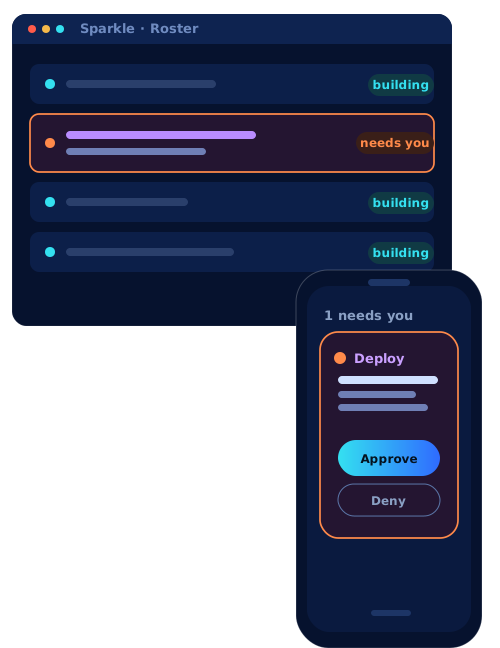
Agents that need a decision float to the top. Agents that are happily building sink to the bottom. You're not watching a terminal blink. You're running a software operation.
2 orchestrators · 5 workers
Always Be Tokenmaxxing
What's on your screen, in your hand.
If you try to spin up an agent before you walk out the door (yes, every time. We see you.)… If you make sure not to go to sleep without setting your Claude /goal for the night… If you have a hard time concentrating on the human sitting in front of you because you fear your agent is stuck, just waiting on you for one response… then this feature is for you:
Freedom to #ABT
Every agent running on your desktop is mirrored to your phone in real time, with sub-100ms latency. Blocked agents are flagged in both places. If you're away from your Sparkle desktop app, you'll get a mobile push notification.
You can approve, deny, or chat with your agent right from your phone.
Stop being the bottleneck your agents wait on. #ABT, and you get your day back.
Agent flagged this as risky
We'll notify you when the iOS app is ready. No spam.
Every guardrail is something you'd otherwise forget.
Sparkle is built around a set of strong opinions about how software should be built with AI agents. These opinions are what make it work for people who just want to build without reading a 40-page guide on git workflows. Here's every opinion Sparkle enforces, and why.
| The Rule | What It Prevents |
|---|---|
| No direct pushes to main: PRs required | Agents accidentally shipping broken code to production |
| Every agent starts from a fresh origin/main | Building on top of another agent's unfinished work |
| No force-pushing to main, ever | Silently dropping commits that other agents already built on |
| Production only deploys through main | Accidental shipping of untested feature branches |
| Risk-tiered approvals: caution → dangerous → auto | Agents deleting your database without your knowledge |
| Production Readiness Gate (0–100 score) | Shipping something half-built because an agent said it was done |
| Agent worktrees isolated outside the project tree | An agent writing to files it wasn't supposed to touch |
| Your credentials never pass through Sparkle | Your API keys being captured in logs or training data |
The full list of 16 enforced rules, and which ones open source users can modify, is on the Features page →
Highlight anything. Understand everything.
The terminal is visible. You can see everything Claude Code is doing. But you don't have to decode it alone.
Highlight any text in the terminal (an error, a command, a file path, a cryptic stack trace) and get a menu of ten actions: Explain this. Copy it. Search the web about it. Run it as a command. Create a task from it. Save it as a note. You're not expected to know what any of it means. That's Sparkle's job.
Go deeper on the features people ask about most
Orchestrator & workers
Your chief agent decomposes a spec into isolated worker agents, then merges their branches back one at a time.
Risk-tiered approvals
Safe work runs on its own; a risky change waits for you on-screen and on your phone before it ever runs.
Status pipeline
See exactly where every agent's code is — Uncommitted, Committed, Pull Request, On Main, Merged — at a glance.
Multiple Claude accounts
Stack more than one Claude Max plan and Sparkle routes each agent to the account with the most headroom.
Screenshot vision
Grab any region of your screen or drop an image on the Composer — your agents see exactly what you see.
Prompt history & search
Every prompt across every project is remembered and searchable, with ghost-text autocomplete of your past phrasing.
You've been a builder this whole time.
You just didn't have the modern tool you needed to build your thoughts.
macOS 11.0+ · Universal · ~7MB · No monthly subscription
iOS app coming soon. Join the waitlist