The Composer
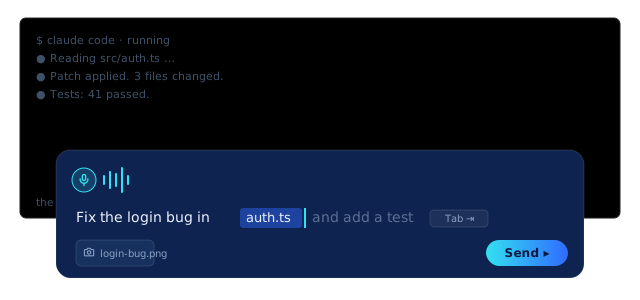
The Composer is a real, modern text editor that floats as a bottom overlay directly above the live terminal. You type (or speak) your instruction into it, shape it like you would in any editor, and send a clean, complete request to Claude Code. It is the surface you actually live in, and it is the single most important idea in Sparkle: you work above the terminal, not inside it.
How it works
The Composer sits at the bottom of the window and, at rest, covers the terminal's input line. That is on purpose: it is how your typing gets steered into a real editor instead of into raw terminal stdin. It auto-grows as you write, so a three-paragraph instruction is as comfortable as a three-word one. When you are ready, you Send, and the finished text goes to the agent as one clean message.
Think of the Composer as the message box you already know from texting or email, except the thing on the other end is an AI that builds software. You click where you want, type like normal, fix a word by selecting it, and the usual shortcuts work: copy (⌘C), paste (⌘V), undo (⌘Z), select-all (⌘A). Nothing is sent until you press Send, so you can take your time and read it over first.
A few terms, so nothing here is a mystery: an agent is one AI worker that does the building, and Claude Code is the real AI engine doing the actual coding under the hood. The Composer is just the friendly box where you tell it what you want, in plain English.
The Composer is a full editor, so stop treating your prompt like a one-shot you have to nail in a single line. Draft it, restructure it, paste in a stack trace, drag in a screenshot, undo the part that went sideways, then fire it off. Tab accepts the ghost-text suggestion when your past self already wrote this prompt. ⌘J drops you to the bare terminal and back when an agent's menu wants a direct keypress.
The leverage: a clean, complete instruction beats five half-formed ones. Because you can actually edit before you send, you front-load the thinking into one good message instead of babysitting a sloppy one through three correction rounds.
Mechanically: the Composer is a bottom overlay (Composer.tsx) that covers Claude Code's PTY input line, so keystrokes land in a real editor with full caret control, selection, undo, and clipboard, then flush to the agent as a single message. It auto-grows to content. Drag the grab-handle up to size it for multi-line prompts; drag it down past the floor and it minimizes to a slim restore bar (composerDrag.ts owns the snap/minimize geometry). Arrow keys at the text edges hand focus back to the terminal (composerArrowOverflow.ts), so cursor navigation flows between the two surfaces instead of trapping you. Height and minimized state persist across launches (composerPersist.ts).
Minimize to bar and focus routing
Press ⌘J (or drag the handle to the floor) and the Composer collapses to a roughly 22 to 40px bar reading "▴ Message your agent." That hands Claude Code full-screen TUI access for the moments a raw terminal menu wants your keypress directly. Press ⌘J again and the Composer restores instantly, focused and ready.
Sometimes the AI asks a question in its own little menu, down in the terminal, and wants you to answer it there. When that happens, tap ⌘J: the message box shrinks to a thin strip so you can see and answer that menu. Tap ⌘J again to bring your message box back. You never lose your place, and you are never stuck.
⌘J is your toggle between "I'm composing" and "I'm driving the raw TUI." Minimize when an agent throws an interactive prompt you want to answer with arrow keys; restore the second you want to write a real instruction again. It is muscle memory within a day.
⌘J is a pure focus-and-visibility toggle (composerToggle.ts): in the Composer it minimizes and drops focus to the terminal; in the terminal it restores and refocuses the Composer. Ctrl and Alt are excluded so terminal combos stay free, and Cmd+J is never forwarded to the PTY (terminals send Ctrl+J as LF). Net: zero-cost switching between a modern editor and the full-screen shell, no mode you can get stranded in.
Why it matters
The Composer is where voice, vision, history, and ghost-text all surface in one place. It is the human layer of Sparkle: the thing you point at the work, the thing you edit your intent in, the thing that makes a fleet of agents feel like one conversation instead of a wall of stdin.
This is the part that should make you exhale. You do not have to learn cryptic commands, and you do not have to type a perfect instruction on the first try. You write the way you already write, you fix mistakes the way you already fix them, and the scary black window underneath stays out of your way. The Composer is the proof that this tool was built for you, not for someone who memorized a manual.
This is most of why Sparkle feels fast. The round-trips you used to make (retype the prompt, fight the input line, lose the whole thing to a stray keypress) are gone. One editor, full shortcuts, drag-in context, accept-with-Tab history. You spend your attention on what to build, not on wrestling the input box.
The substance: a single editable buffer with real caret control, selection, undo, and clipboard sitting in front of the same Claude Code engine you would otherwise drive through raw stdin. Same engine, vastly better ergonomics for composing a non-trivial instruction. The terminal is still one layer down and one click away when you actually want it.
vs. the 1980s terminal
The terminal's input line has not meaningfully changed since the 1980s. You cannot click to place your cursor. You cannot highlight a word and delete it. There is no undo. There is no right-click. Press the wrong key mid-prompt and the whole thing is gone, so you start over. The Composer adds every one of those, as a layer on top of the unchanged terminal.
Everything you take for granted in a normal text box (clicking exactly where you want, selecting a word and deleting it, pressing undo when you fumble) simply does not exist in a raw terminal. The Composer puts all of it back. You do not have to give up a single comfort you already have to build real software.
The terminal input is a single editable line with no undo and no mouse. The Composer is a real editor. That is the whole difference between "I have to retype this perfectly in one go" and "I draft, edit, and send when it's right." You already know which one ships faster.
The terminal still cannot click-to-place a caret, select-and-delete a token, undo, or right-click. None of that is added to the terminal; the terminal is untouched and still load-bearing underneath. The Composer is a discrete overlay on top, and ⌘J collapses it on demand to hand the full TUI straight through. You lose nothing and the raw shell stays exactly where you left it.