iOS App & Push Notifications
Your agents keep building after you close the laptop, and they reach you on your phone the moment one of them gets stuck. When an agent hits something it cannot decide on its own, a push notification fires, you open a card built for a 3-second decision, you tap Approve or Reject, and the agent picks right back up. On the desk, the same attention engine drives native macOS notifications and a live dock badge so you always know exactly how many agents are waiting on you.
The whole point: software gets built at night, on weekends, while you're on a plane. You should not have to babysit a terminal to make that happen.
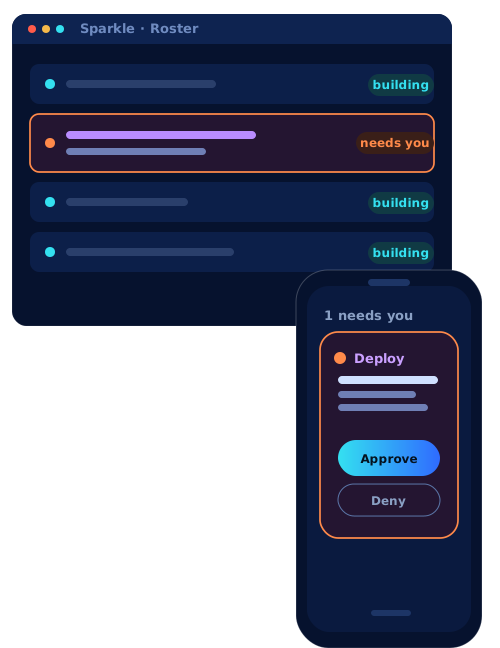
Your desktop, mirrored to your pocket
What is on your screen is in your hand. Every agent on your desktop roster streams to the phone in real time, with sub-100ms latency, so the phone is not a separate, stripped-down app. It is a live mirror of the desk: you can watch an agent's terminal scroll, see which agents are building and which one is blocked, and when one crosses into a state that needs you it lights up in both places at once.
When you tap Approve, the decision round-trips straight back to the gate the agent is parked on, and it resumes on your desk, instantly. That is the whole liberation: you are never chained to the terminal. Kick off the work, put the phone in your pocket, and the building keeps moving whether you are at the Mac or out living your life. You lose seconds to a decision, not a day to a blinking cursor.
How it works
When an agent reaches a gate it cannot pass on its own, for example a commit to review, a risky command to approve, or a question to answer, Sparkle treats that as an edge: the moment a agent crosses from "working" into "blocked." Edges are what trigger alerts. Steady states do not, so you are not spammed by an agent that is simply busy.
Each alert carries what the agent wants and Sparkle's own risk read on it, sorted into tiers so the loudness of the alert matches the stakes:
Think of it like a smart assistant watching a roomful of helpers for you. Most of the time the helpers (agents) just work quietly. When one of them needs a yes or no, it raises its hand, and Sparkle taps you on the shoulder so you do not have to keep checking.
On your phone you get an approval card. It shows, in plain language: what the agent wants to do, and how risky Sparkle thinks it is (a little colored badge). You read it, you tap Approve or Reject, and the agent continues. That is the entire job. No terminal, no commands, nothing to memorize.
The colors above are tiers. yellow means "heads up, your call." red means "this could do real damage, look closely" (so Sparkle shouts louder: push and a text and an email). green means "all done." And is your friendly morning summary at 7am of what got built while you slept.
The mobile agent approval card is the unlock. Your agents do not stall on a gate just because you walked away from the Mac. The push hits your phone, you open the card, you see the request plus Sparkle's risk badge, and you clear it in about three seconds. Then the agent resumes building.
That is what makes overnight and out-of-office building actually work. Queue the work, go live your life, and clear approvals from your pocket whenever they pop. The tiers keep it sane: routine Caution stuff is a quiet push, Dangerous escalates to SMS and email so you cannot miss it, Complete tells you a build landed, and the Briefing lands at 7am so you wake up to a status report instead of a mystery.
Edge-triggered, not level-triggered. The desktop engine (engine/attention.ts)
computes status transitions per agent and fires exactly once per edge into an enabled
state (waiting, approval, errored, idle/your-turn, done). "Working," "blocked," and
intentional "stopped" are off by default, so the channel stays low-noise. The Rust side
(src-tauri/src/attention.rs) owns the native banner and dock badge; the React side
(useAttentionNotifications.ts, components/NotificationsMenu.tsx) owns in-app
surfacing.
The mobile path is an Expo / React Native app plus an installable PWA today, talking to
apps/orchestration over Socket.IO with Knock fanning out the channels per tier; native
APNs push arrives in the TestFlight build. The card (components/ApprovalCard.tsx,
RiskBadge.tsx, StatusDot.tsx) renders the agent's pending request and the risk
assessment, and your tap round-trips an approve/reject back to the same gate the
Claude Code worker is parked on.
The dock badge
On macOS, the dock badge is always-on situational awareness. It counts the agents in waiting plus needs-approval across every window: a single number that answers "how many things need an answer from me right now." Click a notification and Sparkle focuses that exact agent so you go straight to the decision.
You know the little red number that sits on an app icon to tell you how many unread things you have? Sparkle's dock badge is that, but for "agents waiting on you." If it says 2, two helpers need a yes or no. If it says nothing, you are all caught up and can relax.
The badge is your at-a-glance queue depth. Zero means everything is humming. A number means go clear it. Click any banner to jump straight to that agent instead of hunting through windows. It is the same waiting + approval count you would otherwise be eyeballing across tabs, computed for you.
The badge aggregates waiting + approval across all windows, so multi-window fan-out
still gives you one truthful count instead of per-window guessing. Native banners are
deduped per edge, and clicking one routes focus to the originating agent. Source of
truth is the same engine/attention.ts transition detector that feeds mobile, so the
desk and the phone never disagree about who needs you.
Why it matters
This is the feature that lets you have a life. You do not have to sit and stare while the work happens. Kick off a build, put the phone in your pocket, and Sparkle will nudge you only when it genuinely needs you. Most of building is waiting, and now the waiting happens without you.
Autonomous, overnight building only works if the agent can reach you when it is blocked. Otherwise it just sits there at 2am, stalled on one approval, wasting the whole night. Push plus a 3-second card fixes that. You become the bottleneck for seconds, not hours, and your agents stay busy the rest of the time.
The constraint on parallel autonomous agents is not compute, it is your attention latency. An agent blocked on a human decision is dead time. Pushing the decision to your phone with enough context to answer in seconds collapses that latency, which is what makes fanning out many parallel agents overnight a real strategy rather than a demo.
vs. the 1980s terminal
A terminal cannot notify you. It cannot reach your phone. It cannot accept a remote approval. It sits there, blinking, until you come back to it and type the next thing.
The old text window has no way to get your attention. If a command is waiting on you, it just waits, silently, forever, and you would never know unless you happened to be looking right at it. Sparkle turns that silence into a tap on your phone with a clear yes/no question.
In a raw terminal, a blocked process is invisible until you alt-tab back and notice the prompt. No badge, no push, no "3 things need you." Sparkle makes "who is waiting on me" a number on your dock and a card in your pocket, so the cost of stepping away drops to zero.
Terminals are level-state, pull-only, single-host. There is no OS notification, no badge, no edge-triggered alerting, and certainly no remote approval channel from a phone back into a parked process. The attention engine adds edge detection, cross-window aggregation, and a tiered fan-out (in-app, banner, dock, push, SMS, email) that a shell has no concept of.