Terminal Superpowers
The real terminal is fully visible inside Sparkle: every command, every file change, every error scrolls by exactly as Claude Code produces it. The superpower is what happens when you highlight any line. The moment you release the mouse, the selection is copied and a small floating menu of about ten contextual actions appears: Explain, Fix it, Run as cmd, Search web, New task, Save note, Think, Ask..., Send to agent, and more. Raw output stops being a wall of text you have to decode alone and becomes something you can act on with one click.
How it works
Here is the whole trick, and it could not be gentler. You see a line in the terminal (an error, a file name, a confusing message) and you drag your mouse across it to highlight it, exactly like highlighting a sentence in an email. The instant you let go, Sparkle copies it for you (you will see a little "✓ Copied to clipboard") and a small menu pops up right there.
Two groups of buttons appear. Work with AI has things like Explain (Sparkle tells you in plain English what that line means) and Fix it (it asks Claude Code to repair the problem for you). Do something has handy verbs like Search web (opens a web search of the text), Save note (tucks the text into a NOTES.md file in your project), and New task (turns it into a to-do). You do not type a single command. You point at the scary text and pick what you want done with it.
Select a line, get a verb. The popup splits into Work with AI and Do something, and every button is wired to the exact text you highlighted (it is auto-copied the moment you release, so you can paste it anywhere too).
The ones you will reach for constantly: Explain and Fix it on a stack trace, Run as cmd to take a suggested command and actually execute it in a fresh shell tab, Send to agent to drop the selection into the current agent's prompt without sending (you edit, then fire), Ask... to pose a specific question about the selection, and New task / Save note to capture something for later without breaking flow. The whole "error, copy, alt-tab to a browser, google, guess, retry" loop collapses into one click that already has your context.
Mechanics, since you will want them. Terminal.tsx copies the selection on
onMouseUp and renders SelectionPopup through a portal (so terminal
overflow:hidden cannot clip it), positioned with viewport-clamped fixed coords. The
actions live in selectionActions.ts, unit-tested independently of the component:
- Explain / Think / Ask... open the project's singleton Think agent with the selection (and your question) as the initial prompt.
- Fix it writes the selection into the owning agent's PTY framed as a fix request
and submits it. Send to agent pastes it without the trailing
\r, so you edit first. Both wrap the text in bracketed-paste markers and strip any embeddedESC[200~/ESC[201~in a loop, so a crafted selection cannot terminate paste mode early and inject keystrokes. - Run as cmd spawns a new shell agent that runs the selection in the project root. Search web opens a Google query. Save note appends to NOTES.md; New task creates a bead task and toasts back the new id.
It is the Unix instinct (compose small operations over text streams) pointed at your scrollback, except the program you pipe into is the model, with your repo as context.
Why it matters
The terminal was built to assume you already know the magic words and to punish a single typo with a wall of red. That is why it feels intimidating. Terminal superpowers flip that completely: you are never expected to understand a line before you can do something useful with it. Confused? Highlight it and hit Explain. Broken? Highlight it and hit Fix it. You get to stay curious instead of stuck, and you learn what things mean as you go, in plain English, without ever leaving the app.
This is the friction-killer. The minutes you never notice you are bleeding (the context-switches into a browser, the half-remembered flag you re-google for the hundredth time) are exactly what this deletes. Because the action already carries your selection as context, the AI is not guessing about a generic error; it is looking at your error, in your repo. New task and Save note also mean a good idea or a real bug never falls on the floor mid-build: capture it in one click, keep shipping, deal with it later.
The value is that context is free and never has to leave the app. You are not shuttling text through a clipboard into a browser and back, hand-assembling state in your head. Highlight, pick a verb, the selection is already attached. Run as cmd in an isolated shell tab, Fix it straight into the owning agent's PTY, Search web when the answer is genuinely external. Cheap to ignore when you do not need it, genuinely sharp when you reach for it. The terminal stays your terminal; this just removes the copy-paste tax around it.
vs. the 1980s terminal
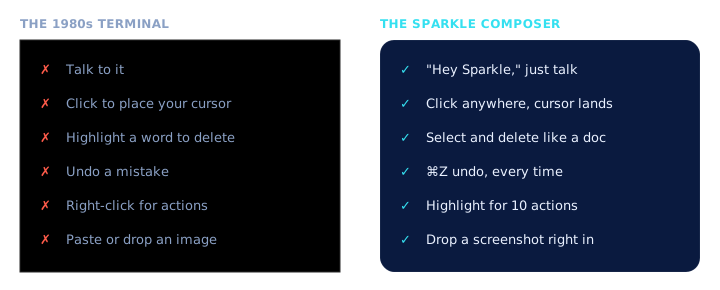
The terminal has not fundamentally changed since the 1980s. Selecting text in it does exactly one thing: it copies. There is no right-click menu, no "explain," no "fix it," no "turn this into a task."
In a plain terminal, highlighting that frightening red error gets you... the same red error, now also on your clipboard. You are still on your own to figure out what it means and what to do. Sparkle keeps the terminal exactly as it is and adds the menu that was always missing, so the same highlight that used to leave you stuck now hands you ten ways forward.
A 1980s terminal selection is a dead end: copy, then go do all the work yourself somewhere else. Sparkle attaches verbs to the selection so the work happens in place. Same black box of truth underneath (you see everything Claude Code does), minus the detour tax that the bare terminal never thought to remove.
A bare terminal has no notion of a selection action beyond clipboard copy: no context menu, no model in the loop, no structured hand-off to a task tracker or a notes file. Sparkle does not reinvent the shell; it keeps the real terminal fully visible and layers a portal-rendered action surface over the scrollback. You still drop into the raw shell whenever you want. You just gain ten verbs the terminal was never going to grow on its own.